

Anker USB C Hub, Smart Display Hub, Dual Monitor USB-C Hub,No Charger
$99.99
Related Products






Price: $99.99
(as of Oct 12, 2026 03:44:45 UTC – Details)
Product description


1 240 Hz Display
2 Ultra-Smooth Motion
3 Work and Play
4 Faster Visual Feedback


1 Customizable Focus Timer
2 Your Desk Companion
3 Personalize Your Display
4 Web and App Control
5 Compact Space-Saver


1 10-in-1 Connectivity
2 Declutter Your Desk
3 Pass Through Charging
4 10Gbps Data Transfer
5 Magnetic Base


1 Button Control Guide
2 Universal Compatibility
3 Resolution Support
4 Display Modes
5 Important Product Notes
Will this hub work with my laptop? How do I check compatibility?
For full functionality, your laptop’s USB-C port must support Thunderbolt 3, 4, or 5, USB4, or DP Alt Mode for HDMI / DP output, as well as Power Delivery for PD-IN charging. The laptop must also provide enough power for the hub to operate properly.
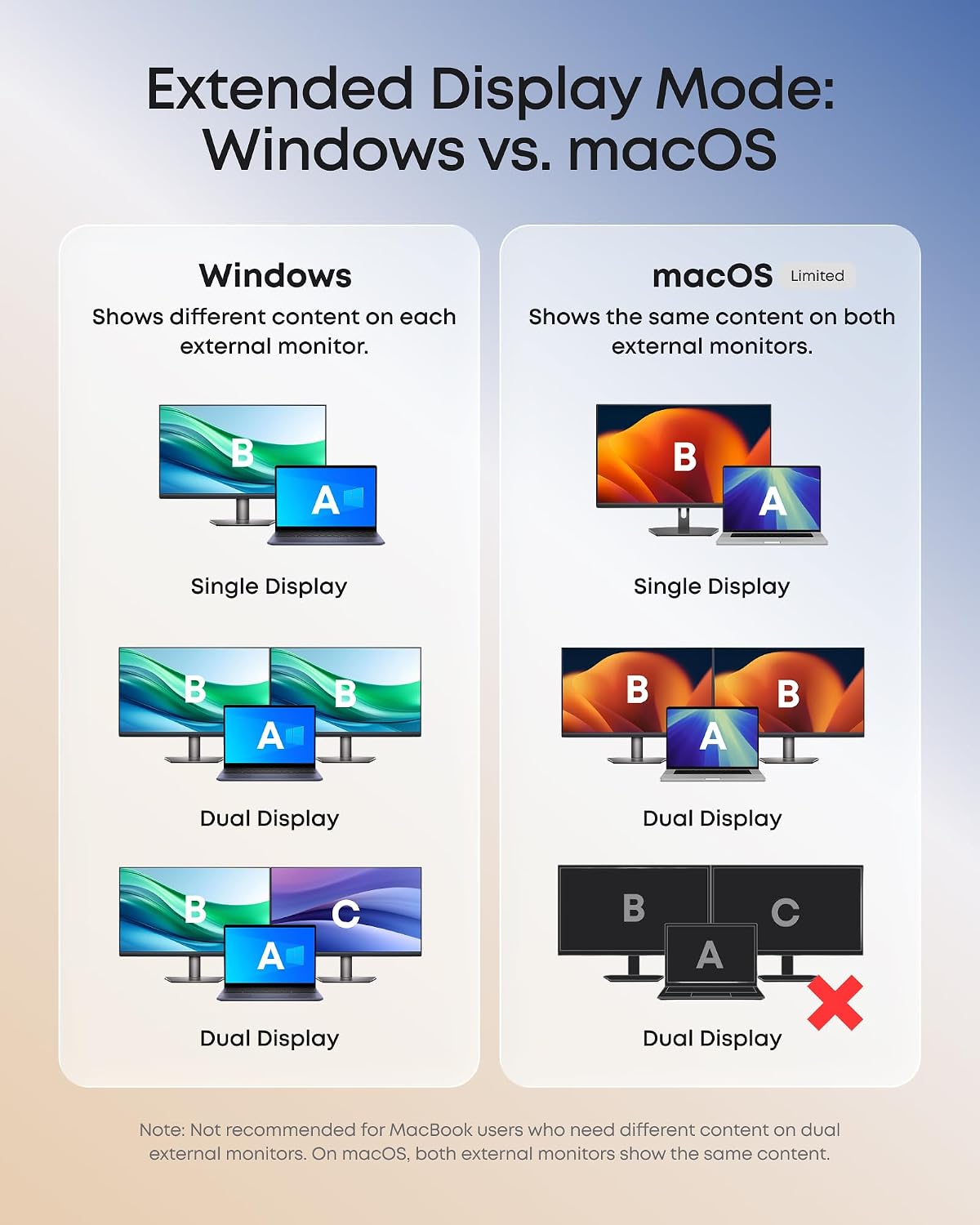
Can this hub show different content on two external monitors when connected to a Mac?
No. On a Mac, two external monitors connected to the hub will mirror the same content. Windows supports both SST and MST, while macOS does not support MST for dual different displays.
Does this hub include a power adapter and charging cable?
No. A power adapter and charging cable are not included. For best performance, use a PD charger rated at 65W or higher. The hub uses 15W – 20W of the input power for its own operation, so the full input power is not available to the laptop.
How do I use this hub to fast-charge my laptop?
Charging performance depends on the charger, cable, and laptop. The hub reserves 15W – 20W from its 100W max input. Use a PD charger rated 15W – 20W above your laptop’s original charger. Some laptops may still show a “slow charging” warning.
Can I connect two USB-C devices to this hub?
No. This hub supports one USB-C downstream device through the front USB-C port. The rear USB-C port is for PD-IN power input only. It receives power from a PD wall charger to power the hub and charge your laptop.
All-in-One Connectivity: The 10-in-1 design features one HDMI 2.1 port, one DisplayPort 1.4 port, 80W Pass through charging from your extra 100W charger, one 10 Gbps USB-C port, one 10 Gbps USB-A data port, two 5 Gbps USB-A ports, one Gigabit Ethernet port, and SD/microSD 3.0 card slots. (Note: Charger not included. For optimal performance, use a 65W or higher USB-C charger.)
Dual Display Support with Up to 2K@240 Hz: Drive a single monitor at up to 4K@144 Hz or 2K@240 Hz, or expand to dual 2K@240 Hz displays for ultra-smooth motion in gaming, editing, and streaming. (Note: Dual 2K@240 Hz output requires a host laptop USB-C port that supports DP 2.1 with DSC 3:1. Video output is supported through HDMI and DisplayPort only.)
Smart Built-In Display: The built-in display shows real-time port status, charging power, data transfer speed, and device temperature. Upload your own images for a rotating slideshow, or press twice to start the customizable focus timer.
Declutter Your Desk Setup: With 80% of ports facing the rear, cables route backward and downward to reduce the clutter common with flat hub designs. A 2.3ft built-in host cable allows flexible placement while keeping the front of your desk clear.
Web and App Control: Customize your smart display, track port status, and adjust the 25-minute focus timer settings on the web dashboard, or run photo album slideshows and firmware updates through the app.
Compatibility: Works with laptops whose USB-C ports support Power Delivery, DisplayPort 1.2/1.4/2.1, and either USB4 or Thunderbolt 3/4/5. Supports Windows 10/11 and macOS. (Note: On macOS, both external monitors will display identical content. This device is not compatible with Linux.)
What’s in the Box: Anker Desktop USB-C Hub with 2.3ft built-in cable, magnetic base, safety sheet with QR code for the user manual, hassle-free warranty, and our friendly customer service.
Customers find the USB-C hub functional and worth the money, with one mentioning it’s perfect for home office use. The display performance receives positive feedback, with one customer successfully driving a Gigabyte M28U at 4K 144Hz. The dual monitor support receives mixed reviews, with several customers noting it doesn’t work with MacBooks.
There are no reviews yet.